Posts

Layout shifts with Google Fonts

Image
 I get page 'layout shifts' when I use 'Google Fonts'. If I say 'font-display: optional' to get round this then I do not see the Google fonts at all, as they do not load in time. I tried to reduce the size of the font file by specifying a font weight and by specifyng the letters in the alphabet as the 'text' to match. But the font file still takes too long to load. I also tried putting Google's intermediate '@font-face' rules directly in my CSS. But the font file still loads too slowly. I also tried downloading the font file onto my website. But the web server is a bit slow and again I do not see the Google fonts. My hosting provider is 'Hostinger'. I did not try adjusting the size of the system fonts to match the Google Fonts to remove the 'layout shifts'. This seems a bit complicated and may not work on all browsers. I am going to try loading fonts into my game using the JavaScript API. My game takes a few seconds to load an...

Adding blog to 'blogarama.com'

Image
 I managed to get 'blogarama.com' to index my blog. I get 50 posts free. I only put my best posts on 'blogarama'. 'blogarama' did not mind when I waited 4 months before adding the next post.  'blogarama' thought I had put a reciprocal link in my blog when I had not. However, I cannot find any of my posts on 'blogarama'. There are a lot of ads. Many directories of RSS feeds seem to have closed in recent years. However, it seems it is still worthwhile having an RSS feed.

I first put '#' before 'rm -rf'

Image
 I always put a '#' before a 'rm -rf' before clearing out old backups. I think a bit and then remove the '#' and then run the command. I once ran '/bin/rm -rf' as the user 'root' and deleted lots of files I wanted.  I even deleted the '/etc/passwd' file and got the famous 'you do not exist' error. I work as the user 'root' because my 'X Windows' system needs this. This is because I upgraded my Linux system myself 'from scratch' and did it slightly wrong.   I get a smiley '(:0)' next to my 'root' user's 'pseudo-terminal' when I run 'who' to show who is logged on

Bug from using old version of Chrome's Lighthouse

Image
 Warnings from Chrome's Lighthouse turned out to be bugs from using an old version of Chrome used for Windows7. Lighthouse said: 'heading elements are not in a sequentially-descending order'. I can get round this by using the 'Lighthouse' option at 'webpagetest.org'. Or I can go to a neighbouring libary that runs Windows10 and the latest Chrome

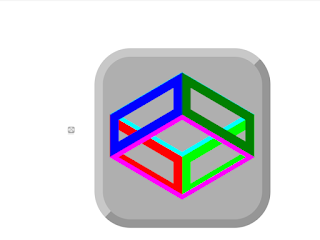
Adapting a 'codepen' icon made with CSS

Image
 I adapted a 'codepen' icon made with CSS made of rectangles made with 'clip-path', with the sides rotated to form a cube. Some of the sides are moved to the front with 'translateZ'. I colored the sides to see how it works:     'codepen.io/Bert-Beckwith/pen/jENyyaK' This is a different way of making a cube. Another way is to rotate 'div' elements. Maybe there is a bug with Chrome: sometimes the sides of the cube disappear if I change the background color of their container. The sides reappear if I click the icon. I tried reflowing the cube, adding 'z-index' and adding '!important' but these did not fix the bug. It is best to use SVG's for icons but I learn about CSS and my old browser does not show SVG's in HTML pages.

Using 'cp -pR' rather than 'cp -a' when making a backup

Image
 I changed from using 'cp -a' to 'cp -pR' when making a backup of the directories I use most. The 'cp -a' command gave an error because a symbolic link could not be created on the FAT file system of the memory-stick that was the destination of the copy. So I removed the '-d' (no dereference) part of the '-a' option and now 'cp' copies all the files that the symbolic link references. On second thoughts, maybe 'cp -a' is better because it means I do not get duplicate files. There are more tips at: bbingo.xyz/techtips/    

Problems loading pages and with FTP with my hosting provider

Image
 For about 2 months, images were sometimes not loaded into my pages when served by my hosting provider 'Hostinger'. Sometimes Chrome could not load a page at first but then found it. Sometimes I also got errors transferring files with 'FTP'. I could not do a backup with 'FTP' because of these errors. Maybe I should not complain as I chose a very good value 4-year deal when I moved my website from the free '000webhost' to Hostinger. Inflation since has made the deal seem even better. So I get 'Hostinger' to generate a backup every week and download it. It is one big 'gzipped' 'tar' file. I request the backup in the middle of the week as Hostinger says the backup takes a few hours to prepare.  I download the backup at the end of the week.  The download takes only a few minutes. I checked this download file. However, Hostinger says there were some problems with their backups. I tried using the web-based 'file manager' provide...